The typical chatbot conversation at a SaaS company goes like this. Someone on the founding team demos an AI support assistant at a conference or in a competitor product. The idea goes into the roadmap. A vendor is brought in or a build is scoped internally. The estimate comes back at six weeks and a budget that seems reasonable.
Then the build starts.
By week three, someone asks whether the chatbot needs to check a user’s subscription tier before routing a billing question. It does. That requires read access to your product database. The schema has not been documented. The data team is involved now. By week four, someone asks whether resolved conversations should create tickets in Zendesk automatically. They should. That is a write integration with authentication handling and webhook design. The scope has grown. By week five, the question of GDPR compliance for conversation transcripts surfaces. Legal is in the room.
None of this was in the original estimate. None of it is unusual. It happens because chatbot integrations are not standalone features. They are connectors and what they connect to is almost everything.
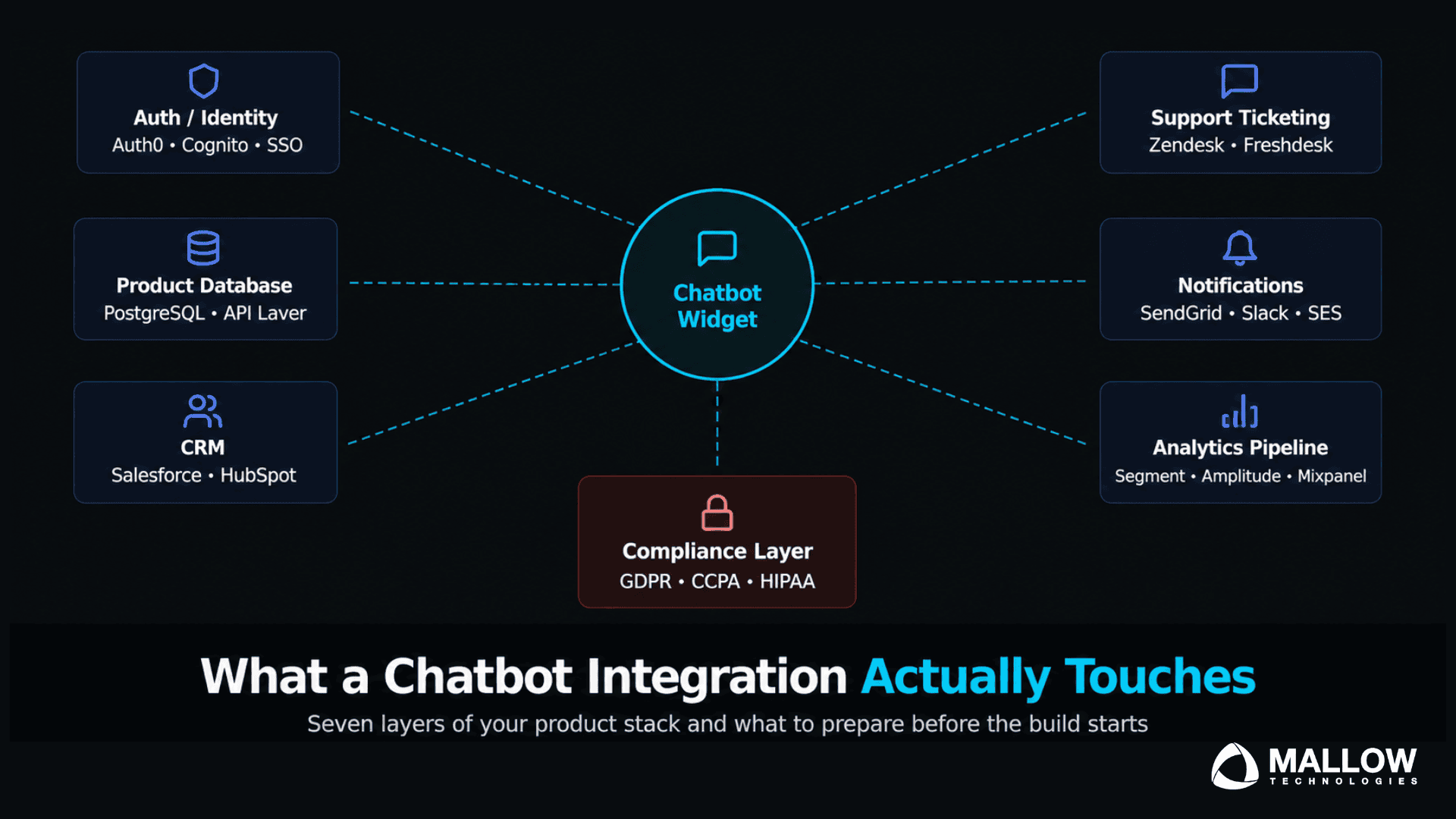
This article is a map of what a chatbot integration actually touches in a typical SaaS product stack, so that when you scope the build, you are scoping the real thing.
Why a chatbot is not a standalone feature

The instinct to treat a chatbot as a contained widget, something you drop into a corner of your interface and wire up to a knowledge base, is understandable. Many chatbot vendors reinforce this framing because it makes the initial sale easier.
The reality is different. A useful chatbot, meaning one that actually resolves queries rather than deflecting them, requires access to the state of your product. It needs to know who the user is, what plan they are on, what actions they have taken, and what data is relevant to their question. It may need to write back to systems, creating records, triggering workflows, and updating statuses.
The moment a chatbot needs to do any of those things, it is no longer a standalone widget. It is a service that sits at the intersection of your authentication layer, your product database, your third party integrations, and your data model. Understanding each of those touch points before the build starts is what separates a well scoped project from one that keeps expanding.
Touch point 1 - Your authentication and identity layer

In most SaaS products, user identity is managed through an authentication provider, such as Auth0, Cognito, a custom session system, or SSO via SAML or OIDC. The chatbot needs to be able to verify the user’s identity before it can access or return any user specific data. Depending on your setup, this means integrating with your existing auth tokens, verifying sessions, or accepting a user identity payload from your frontend.
The scope questions here are specific. Does the chatbot operate in authenticated context only, or does it also handle pre login or logged out users? If pre login users can interact with the bot, there is a separate flow for unauthenticated queries that must be scoped differently. If the chatbot handles sensitive actions like account changes or billing queries, re authentication or elevated verification may be required at certain points in the conversation.
What makes this touch point tricky is that authentication systems are often documented inconsistently in early stage SaaS products. The chatbot build is frequently the first time a team has to formally describe how their authentication layer works as an external contract rather than an internal assumption.
Touch point 2 - Your product database
This is the touch point most founders underestimate. A chatbot that routes by subscription tier, checks feature access, looks up usage history, or surfaces account specific information needs read access to your product database. In most SaaS products, that database is not neatly structured for external consumption. It was built to serve the application, not to be queried by a support layer.
Before a chatbot can access your product database reliably, several things need to be true. The relevant data needs to be accessible through a stable API or a purpose built internal service rather than directly through database queries. The data model for the fields the chatbot will use needs to be documented. Rate limits and query performance need to be understood because a chatbot under load can generate a volume of database calls that an unoptimized endpoint cannot handle.
The specific fields your chatbot will read depend on its job. A billing support bot typically needs subscription tier, payment status, billing date, and invoice history. An onboarding bot needs feature flags, setup completion status, and user role. A general support bot may need all of those plus usage metrics.
The practical step here is to identify every piece of data the chatbot will need in order to answer its intended query types, then verify that each of those fields is accessible via a stable, versioned API. If any of them are not, the API work becomes a prerequisite to the chatbot build, and that work needs to be included in the scope document.
Touch point 3 - Your CRM
Most SaaS products have a CRM layer, whether that is Salesforce, HubSpot, or something lighter. A chatbot that captures lead intent, logs conversation outcomes, or updates contact records needs to integrate with it.
The integration can go in both directions. Read – the chatbot pulls account context from the CRM before the conversation begins, including account owner, contract stage, open tickets, and recent activity. Write: the chatbot creates or updates records in the CRM when a conversation concludes, logging the interaction, tagging the outcome, and updating the lifecycle stage.
The write direction is where scope surprises most commonly appear. Creating a record in Salesforce or HubSpot sounds simple. In practice, it requires mapping conversation outcomes to field values that exist in your specific CRM configuration, handling deduplication logic, managing authentication and API rate limits, and deciding what happens when a write fails.
The scope question to answer before the build is – which CRM actions are required, in which direction, and what does the data mapping look like? Every undefined answer to that question is a discovery that will happen mid build instead of during planning.
Touch point 4 - Your support ticketing system
If your product has a support system, such as Zendesk, Freshdesk, Intercom, or even a custom ticketing layer, the chatbot will need to integrate with it in at least one direction, and usually two.
The read direction: the chatbot checks whether an open ticket already exists for the user before starting the resolution flow. If a ticket is open, the bot can surface its status and save the user the frustration of re explaining a known issue.
The write direction: when the chatbot cannot resolve a query, it creates a ticket. This sounds simple but requires decisions that affect the entire support workflow. What information gets included in the ticket? Does the conversation transcript carry over? How is priority determined? Who gets assigned? Is the user notified of ticket creation? These are not technical questions. They are product and support process decisions that the build team cannot make unilaterally. They need to be specified before development begins.
An additional integration layer here is the escalation handoff. If your chatbot supports live escalation to a human agent, that handoff needs its own flow, including how the context is passed, what the agent sees when they pick up the conversation, and how the transition is presented to the user.
Touch point 5 - Your notification and messaging infrastructure
Many chatbots trigger notifications to users, internal teams, or both. An onboarding bot that detects a user getting stuck might trigger a proactive check in email. A support bot that escalates a critical issue might push a Slack notification to your customer success team. A billing bot that successfully processes a refund request might send a confirmation email.
Each of these touches your existing notification infrastructure, including your email service provider such as SendGrid, Postmark, or SES, your internal messaging tools such as Slack or Teams, and potentially your in app notification system.
The scope question here is not just whether notifications are needed, but what triggers them, what templates they use, who receives them, and how they interact with your existing notification frequency rules. If you have logic that limits how many emails a user receives per day, the chatbot triggered notifications need to respect that logic. This means the chatbot and your notification layer need to share state or communicate effectively.
Touch point 6 - Your analytics and event tracking pipeline
A chatbot generates a category of user behaviour data that most SaaS analytics setups are not built to capture natively. Conversation start rates, intent distribution, resolution rates, abandonment points, and escalation frequency do not appear in your existing product analytics unless someone explicitly instruments them.
Before the build, the question to answer is where chatbot events should live. If you are already using Segment, Amplitude, Mixpanel, or a custom event tracking system, chatbot events should flow through the same pipeline so they can be analysed alongside product usage data. The alternative is a siloed chatbot analytics dashboard that cannot be correlated with retention, conversion, or product engagement. While that may be useful for diagnosing chatbot performance, it is not effective for understanding its impact on the business outcomes that matter most.
The instrumentation decisions made at this stage determine whether you will be able to answer important retention and engagement questions six months from now. Build the pipeline correctly from the beginning or be prepared to rebuild it later.
Touch point 7 - Your data privacy and compliance layer

A chatbot captures conversation data. Those conversations contain user generated content that may include personal information, account details, and sensitive business context. Depending on your user base and geography, that data may be subject to GDPR, CCPA, HIPAA, or other regulatory frameworks. Each framework has specific requirements around data minimisation, retention, deletion, and user consent.
Before the build, confirm the following. What conversation data will be retained, and for how long? Where will it be stored, in your own infrastructure or in a third party platform? Does the third party platform have the compliance certifications your user contracts require? Do users need to consent to AI assisted support interactions? Does your privacy policy cover conversation data collection?
These questions do not have universal answers. They depend on your product, your market, and your existing compliance posture. However, deferring them until after launch is not a practical strategy. Retrofitting a compliance layer onto a deployed chatbot is significantly more expensive and complex than building for compliance requirements from the start.
What this means for your scope document

Every touch point above represents a discrete scope item. Some of them will be simple given your current stack. Others will require prerequisite work, such as API development, documentation, compliance review, or data modelling, before the chatbot build can begin.
The practical implication is that a chatbot scope document needs to map each of these touch points explicitly, even if only to confirm that a given point is out of scope for version one. “We confirmed that the chatbot will not access CRM data in V1 and will only use the knowledge base” is a valid scope decision. “We did not think about the CRM” is a scope gap that will surface during development.
The touch points above also clarify why chatbot integration estimates vary so widely. A chatbot that only queries a knowledge base and routes users to a human agent is very different in scope from one that authenticates users, checks subscription data, writes to a CRM, creates support tickets, and triggers notifications. Both might be described as a support chatbot, but only one requires integration with multiple business critical systems.
If you are planning a chatbot implementation and want to evaluate the integration effort, technical dependencies, and scope requirements specific to your product, connect with our team. We can help you assess your existing stack, identify integration touch points, and define a realistic implementation roadmap before development begins.
Your queries, our answers
No. A basic FAQ chatbot that handles static queries and escalates to email needs almost none of them. The touch points scale with the chatbot's job. The more user-specific and action-oriented the chatbot's intended behaviour, the more systems it will touch. The diagnostic question is - what data does the chatbot need to give a useful answer, and what actions does it need to take?
At minimum, any API endpoints the chatbot will rely on that do not yet exist need to be built first. Auth integration contracts need to be specified. Data compliance requirements need to be confirmed. Deferring these to concurrent development almost always creates blocking dependencies that stall the chatbot build mid-stream.
Often yes, for conversation state, session management, and escalation records. What it should not own is the source of truth data that lives in your product database, such as user records, subscription data, and billing history. Those should be accessed through APIs rather than replicated into the chatbot's data store, as doing so would create a synchronization problem.
Scope its data access precisely. The chatbot should be able to read only the fields it needs to answer the queries it handles. Write permissions should be narrow and require explicit validation logic. All chatbot API calls should go through your existing authentication middleware, not bypass it. Treat the chatbot as an external service calling your API, with the same security posture you would apply to any third-party integration.
The answer varies by company, but the most common answer is the CRM. CRM configurations vary significantly between organisations, field mapping is often non-standard, deduplication logic can be complex, and the data quality expectations of the sales team rarely match what the chatbot can cleanly produce. Plan for more time than the raw API documentation suggests.
Starting with a limited chatbot scope is often the right approach, but success depends on clearly defining what V1 includes and excludes. The biggest risks are creating user expectations that the integration cannot yet support and overlooking compliance requirements that become expensive to address later.
A chatbot is not just a feature. It is a service connected to your authentication, data, support, and analytics systems. When these touch points are scoped early, implementation becomes predictable and manageable. If you are planning a chatbot integration and need guidance on architecture, CRM, ticketing, or compliance requirements, connect with our team to discuss your project.
What happens after you fill-up the form?
Request a consultation
By completely filling out the form, you'll be able to book a meeting at a time that suits you. After booking the meeting, you'll receive two emails - a booking confirmation email and an email from the member of our team you'll be meeting that will help you prepare for the call.
Speak with our experts
During the consultation, we will listen to your questions and challenges, and provide personalised guidance and actionable recommendations to address your specific needs.

Author
SathishPrabhu
Sathish is an accomplished Project Manager at Mallow, leveraging his exceptional business analysis skills to drive success. With over 8 years of experience in the field, he brings a wealth of expertise to his role, consistently delivering outstanding results. Known for his meticulous attention to detail and strategic thinking, Sathish has successfully spearheaded numerous projects, ensuring timely completion and exceeding client expectations. Outside of work, he cherishes his time with family, often seen embarking on exciting travels together.