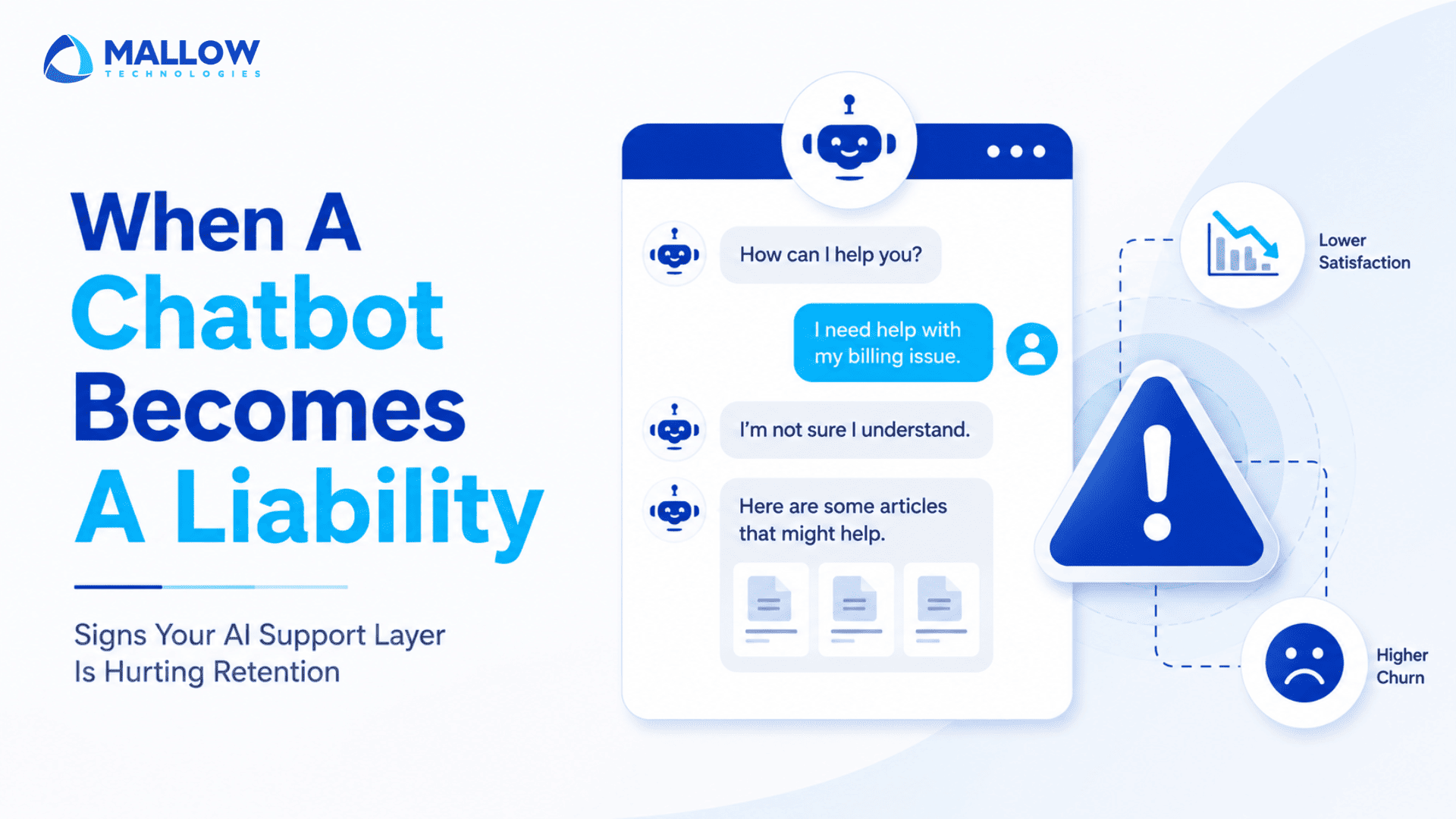
There is a particular kind of product decision that feels unambiguously right at the time. Deploying an AI support chatbot usually falls into that category. Reduce ticket volume, cut response time, free up your human agents for complex issues, improve support coverage to 24/7. The case is easy to make and the demos always look convincing.
The problem shows up later. Not in a dramatic incident report, but in the slow accumulation of signals that something is wrong. A dip in CSAT. Users complaining about “getting stuck in a loop.” Support tickets that arrive pre-frustrated, mentioning they “already tried to get help.” Churn analysis that keeps surfacing support as a contributing factor in exit interviews.
Most founders know their chatbot is not perfect. Fewer recognize when it has crossed the line from “imperfect support tool” to “active retention risk.”
That distinction matters. A chatbot that sometimes fails to answer a question is a gap. A chatbot that frustrates users at precisely the moment they most need reassurance is a churn event. This article is a diagnostic framework for telling those two things apart.
The gap between what a chatbot promises and what users actually experience
A chatbot is, at its core, a promise. It says to users: “You do not need to wait. You can get help right now.” When it delivers on that promise, it builds confidence in your product. When it fails, it does something more damaging than a long wait time would have. It signals that your company did not value the user’s time enough to provide real help.
This is why the calculus is not simply “how many tickets did the chatbot deflect?” Deflection is a supply-side metric. It tells you what the chatbot did for your support team. It says nothing about what the chatbot did to your users.
The metric that matters is resolution quality. Did the user get what they actually needed? Did they leave the conversation feeling more confident in your product, or less? In SaaS, where every interaction contributes to the composite trust that determines whether someone renews, those micro-experiences compound quickly.
The signs below are the indicators that the trust is compounding in the wrong direction.
Sign 1 - Your escalation rate has climbed since the chatbot went live

Escalation rate is the share of chatbot conversations that end with a request for a human agent. A healthy chatbot has a containment rate. An underperforming one has an escalation problem.
If your escalation rate has gone up since deployment, the instinct is often to look at the chatbot’s knowledge base. Is it missing content? Are answers outdated? Those are valid questions. But escalation rate increase often reflects something more structural: the chatbot is being positioned as the first line of support for query types it was never built to handle.
The pattern to look for is not just how many conversations escalate, but when they escalate. If users are escalating after two exchanges, the chatbot failed early, usually because it could not identify the intent accurately. If they escalate after five or more exchanges, the chatbot was confident but wrong. It kept trying and kept missing, which is significantly more frustrating for the user.
Both patterns are fixable. But you have to be looking at escalation cadence, not just escalation volume, to see which problem you actually have.
Sign 2 - Users are abandoning mid conversation
Conversation abandonment is one of the most underreported chatbot metrics in SaaS. Most analytics dashboards surface completion rates and resolution rates. They do not prominently flag conversations where the user simply stopped engaging.
Abandonment mid-conversation is a specific user behaviour that communicates a specific thing: the user decided it was not worth continuing. That is categorically different from a user who completed a conversation but did not get help. The abandoned user concluded that more effort would not produce a better outcome.
The drop-off points in those conversations are where you find the real diagnosis. If users consistently abandon after the chatbot asks for clarification, it may be that the clarification process feels too complicated or the questions feel irrelevant. If they abandon immediately after a fallback response (“I’m not sure I understood that. Could you try rephrasing?”), they have already learned that rephrasing will not help.
Abandonment is your users voting with their behaviour. Track where they leave, not just whether they leave.
Sign 3 - Your CSAT scores are holding but NPS is declining

This is the most subtle and the most dangerous sign on this list.
CSAT measures satisfaction with a specific interaction. NPS measures something broader: how the cumulative experience of your product makes a user feel about recommending it. When CSAT holds steady while NPS declines, it often means individual interactions are fine but something is eroding the overall relationship.
Support experience is a major driver of NPS, and chatbot experience is a part of that. Users who encounter a frustrating chatbot experience three or four times do not necessarily score each interaction poorly. They often accept it as part of using the product. But each experience quietly deposits into a longer running account. When that account gets full enough, it shows up in NPS.
The diagnostic question here is whether your NPS survey responses mention support, help, or assistance in any negative context. If they do, and your CSAT data shows no obvious support failure, the chatbot is the likely bridge between those two data points.
Sign 4 - The chatbot is answering the wrong questions well

A well-trained chatbot is excellent at answering the questions it was trained on. That accuracy can mask a significant structural gap: whether those questions are the ones your users actually need help with.
This misalignment typically develops in one of two ways. Either the chatbot was trained on historical FAQ content that reflects the questions users asked before the product evolved, or it was trained by internal teams who assumed what users would ask rather than mining actual support conversations.
The result is a chatbot that scores high on benchmark resolution rates for the questions it handles, while users with your real current-state questions either escalate, abandon, or find workarounds. The chatbot’s performance metrics look acceptable on paper. What they are actually measuring is performance on the wrong test.
Audit this by comparing your chatbot’s most-resolved query categories against your most-common current escalation categories. If they do not substantially overlap, you have a coverage gap that no amount of tuning will fix without first rebuilding the knowledge layer.
Sign 5 - Users are learning to route around the bot
This one shows up in your support team’s queue before it shows up anywhere else.
When users discover that a certain phrase, a specific keyword, or an immediate escalation request bypasses the chatbot and gets them to a human agent faster, they use it. They share it. In communities, forums, and occasionally in your own product feedback, you will see variations of: “Just say [X] and it takes you straight to a real person.”
This is a product signal, not just a support signal. It means your users have concluded that the chatbot does not represent a genuine attempt to help them. It represents friction they have to navigate to get to the real help. That perception carries far beyond the support interaction itself.
The routing workarounds your users develop are a map of exactly where your chatbot failed them. If they learned to bypass the billing query flow, the billing query flow does not work. If they learned a phrase that escalates immediately, every intent bucket that phrase bypasses is one they stopped trusting.
Sign 6 - Your support team is handling more frustration, not less
One of the clearest and most human indicators that your chatbot is a liability is the texture of the conversations your support team is having after chatbot handoffs.
A chatbot that works well hands off informed, calm users. The agent receives context, understands the situation, and resolves it efficiently. A chatbot that is working against you hands off frustrated users who have already told their story twice, received an irrelevant answer, been asked to rephrase, and are now talking to a human with the accumulated friction of that entire experience.
Ask your support team directly. Do chatbot handoffs feel different from direct contacts? Are post-bot users angrier? Do they require more time to resolve? Are they less receptive to standard resolution paths because trust is already depleted?
If the answer is yes, your chatbot is not reducing support load. It is front-loading frustration into every interaction it touches.
What to do when you recognise these signs

Recognising these signs is the first part of the work. The response depends on how many of them apply and how severely.
If one or two signs are present, the issue is likely tunable. Audit the specific failure points, rebuild or expand the knowledge base for the affected intent categories, revisit the fallback logic, and set up measurement to confirm improvement. These are maintenance issues.
If three or more signs are present, and especially if they are concentrated in high value segments of your user base, the chatbot needs a structural review. That means going back to the problem definition, revisiting who the primary user is, what their actual current query distribution looks like, and whether the chatbot’s architecture is right for the job it is being asked to do. Patching a misaligned chatbot with better answers is like tuning an engine that is installed in the wrong vehicle. If you need an external perspective, talk to an AI strategy expert to assess whether your chatbot is solving the right problems for the right users.
In both cases, the framing that matters is not “how do we improve the bot?” It is “what does this user actually need in this moment, and is this the right tool to give it to them?”
A chatbot that answers well for the right users on the right queries is a retention asset. One that creates friction for the wrong users on the wrong queries is a churn driver that looks like a cost saving.
The data to tell those apart already exists in your platform. The work is knowing what to look for.
Your queries, our answers
Direct attribution is difficult, but there are reliable proxies. Look at whether churned users had a higher rate of chatbot interactions in their last 30 days, and whether those interactions had lower resolution rates than retained users. Exit survey data mentioning support is another strong signal. Direct causation is hard to prove, but directional correlation is usually visible once you look for it.
It depends on your query complexity, but a common benchmark for B2B SaaS support is 60 to 70 percent containment for tier-1 queries. Below 50 percent on straightforward FAQ-type questions usually indicates a knowledge base or intent recognition problem. Above 85 percent on complex queries warrants scrutiny, very high containment on difficult problems sometimes means users gave up rather than the bot succeeded.
Not necessarily. If volume is manageable, adding a clearly visible "talk to a person" option at every stage reduces user frustration significantly while the underlying issues are addressed. Hiding the human escalation path during a known period of chatbot underperformance is one of the fastest ways to turn a retention risk into a churn event.
For an active SaaS product, quarterly at minimum. After any significant product update or pricing change, an audit should be triggered immediately. The gap between product reality and chatbot knowledge is one of the most common causes of the "answering the wrong questions well" failure mode.
Yes. Resolution rate and experience quality are not the same thing. A chatbot that resolves a billing question but requires the user to navigate six confusing steps, gets the order of questions wrong, or responds in a tone that feels cold or dismissive can leave the user feeling worse about your brand even though the technical outcome was correct. Experience quality matters independently of resolution outcome.
A chatbot can hurt retention when coverage gaps, poor conversation design, and unresolved user friction go unchecked. While chatbot ROI can be significant, the real cost of an underperforming bot appears in customer dissatisfaction, lower renewals, and declining trust. The difference between a chatbot that drives retention and one that drives churn is rarely the technology itself. It comes from continuously measuring performance, identifying failure points, and ensuring the chatbot still delivers on its original promise to users.
What happens after you fill-up the form?
Request a consultation
By completely filling out the form, you'll be able to book a meeting at a time that suits you. After booking the meeting, you'll receive two emails - a booking confirmation email and an email from the member of our team you'll be meeting that will help you prepare for the call.
Speak with our experts
During the consultation, we will listen to your questions and challenges, and provide personalised guidance and actionable recommendations to address your specific needs.

Author
SathishPrabhu
Sathish is an accomplished Project Manager at Mallow, leveraging his exceptional business analysis skills to drive success. With over 8 years of experience in the field, he brings a wealth of expertise to his role, consistently delivering outstanding results. Known for his meticulous attention to detail and strategic thinking, Sathish has successfully spearheaded numerous projects, ensuring timely completion and exceeding client expectations. Outside of work, he cherishes his time with family, often seen embarking on exciting travels together.